Registered members of BongaCams are provided with a wide range of BongaCams account settings and configurations. As one of the best adult cam sites, BongaCams has managed to gather a huge international community consisting of both viewers and cam performers. Thus, it is vital that the website offers a convenient and user-friendly interface, accompanied by detailed account configurations. All account information can be edited by the user manually any time after having successfully obtained an account on BongaCams. What kind of information does it usually include?
BongaCams account profile information
To be able to get access to your personal profile information, you need to log in or sign up first.
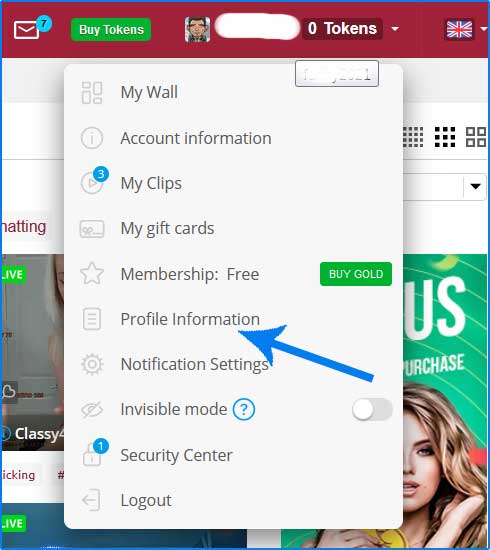
After having successfully completed registration steps, you will need to:
- Click on your profile’s username in the top right corner of the adult cam platform’s main page.
- Choose the “Profile information” section to proceed.
- Feel free to edit any profile information by clicking on the “Edit” button next to the particular configuration.
Keep in mind that after having obtained your personal account on BongaCams adult cam service, it becomes visible to other registered users, as well as broadcasters. In case you decide to upload your personal profile picture, it will become your icon picture upon using the chat of a particular broadcaster. Furthermore, profile information includes some basic facts to be edited by the member. These are:
- Gender.
- Location.
- About me section.
- Birthday.
- Physical parameters.
Apart from that, the BongaCams account features some other essential configurations.
VIP account overview
If you want to get acquainted with VIP status details and info, click on the “VIP Overview” section located right next to the “My profile information” sections in your account settings.
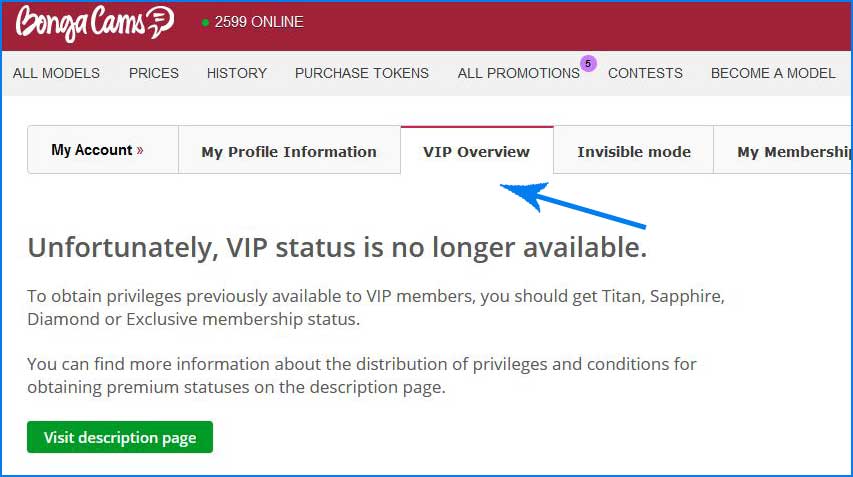
As for today, VIP status is no longer available to be obtained. However, BongaCams is still planning on returning the opportunity to become a VIP member of the adult cam platform with even more additional benefits.
Getting a VIP status usually involves previously obtaining such available memberships, like Titan, Saphire, Diamond, and Exclusive. This can be done within your personal BongaCams account settings. To be able to get more details related to the advantages of getting a particular membership status, click on the “Visit description page” button available in the “VIP overview” account settings section. By doing so, you will be redirected to the “My Membership” section, containing all vital information on the offered user levels.
BongaCams account invisible mode
All registered members of the BongaCams adult cam platform are given the opportunity to enable the invisible account mode. By doing so, your account will be hidden from the broadcasts chats, making you an invisible viewer as your nickname will not be displayed.
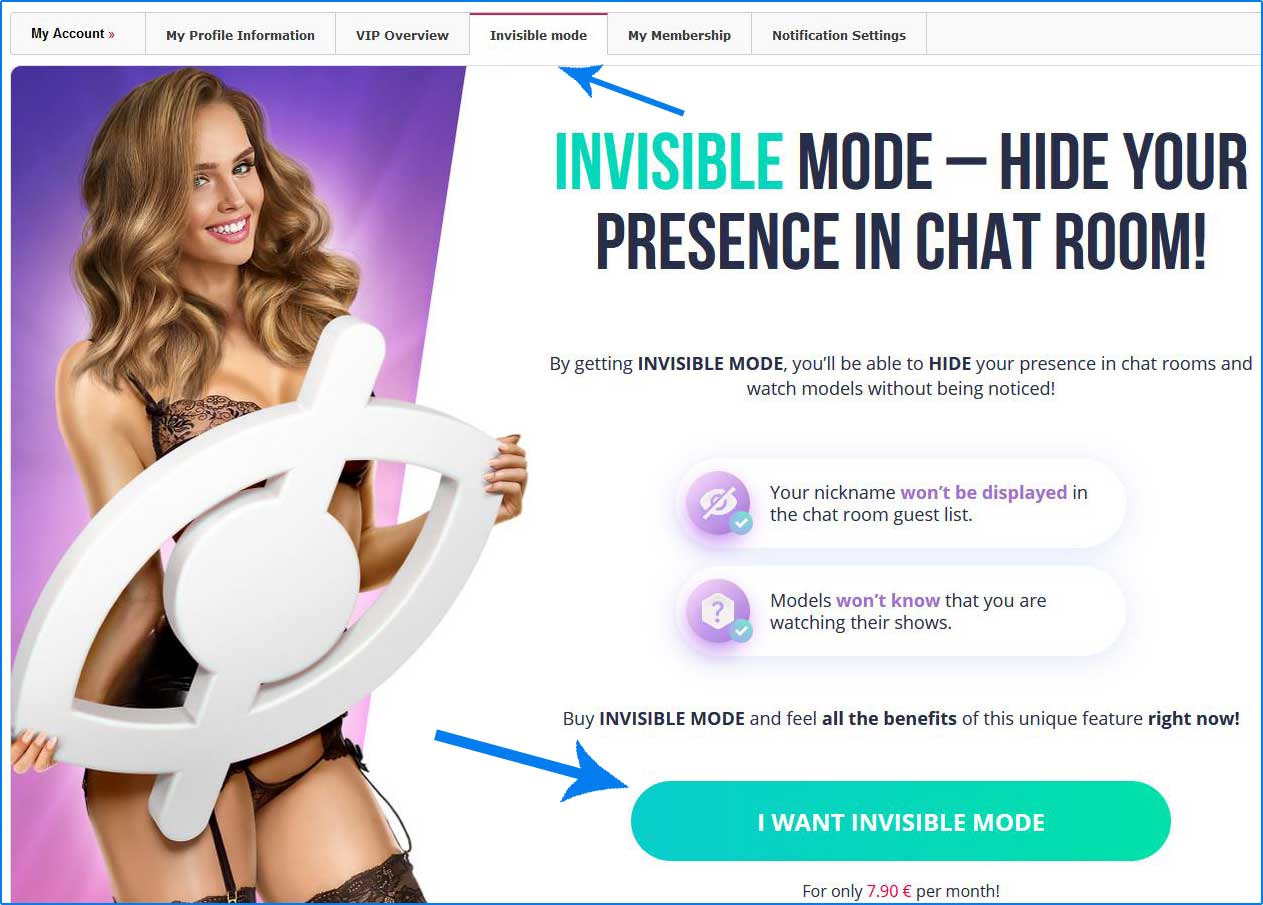
To be able to obtain BongaCams invisible mode, follow the instructions given below:
- Log in or sign up if you are new.
- Proceed to your personal account settings by tapping your nickname in the top right corner of the website.
- In the pop-up menu press the “Profile information” button to access your BongaCams account configurations.
- Click on the “Invisible mode” section.
- Press the “I want invisible mode” button. A new window requiring providing billing details will be opened.
Keep in mind that invisible mode is available for approximately 8 Euros monthly. Upon making a purchase, the members are provided with safe and convenient payment methods. In terms of receiving any additional information or billing assistance from the competent staff of the BongaCams adult cam source, feel free to press the “24/7 support” button on the top right corner of the billing window and choose a suitable contact method to get in touch with the online support center.
BongaCams membership
The importance and benefits of BongaCams membership have been already briefly mentioned before. By clicking on the “My membership” section in your personal account settings, your current membership status will be displayed.
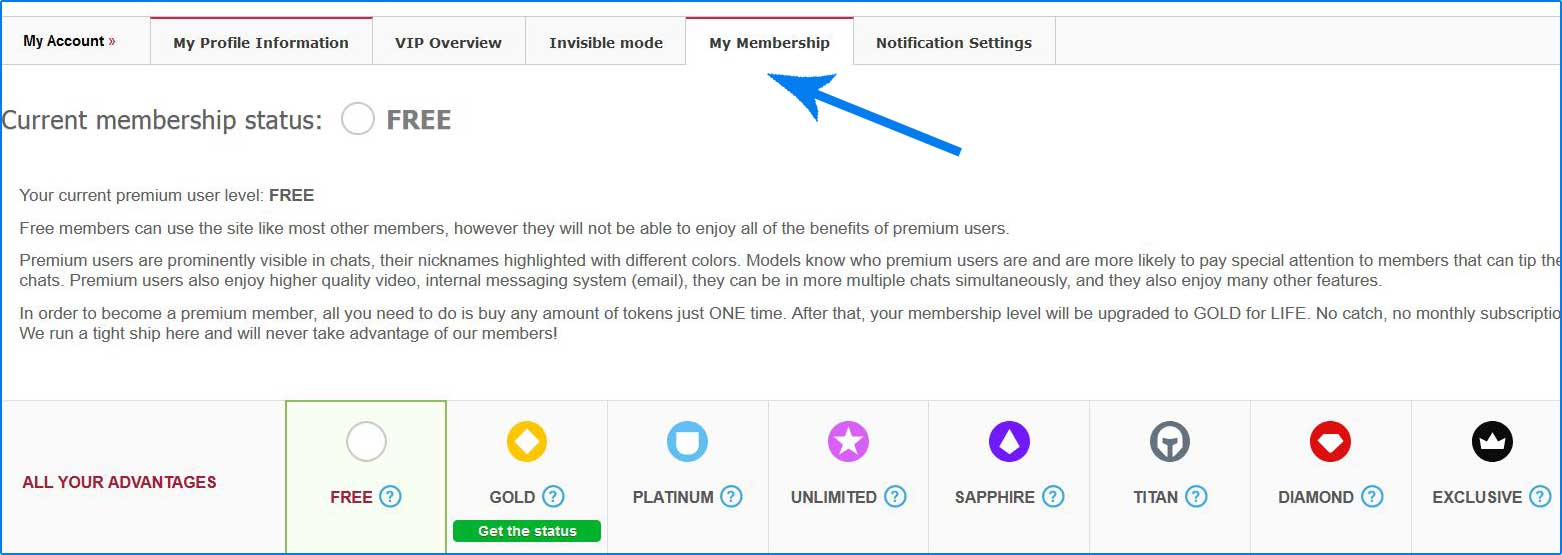
As for today, BongaCams features the following membership statutes available to be obtained by registered members:
- Free.
- Gold.
- Platinum.
- Unlimited.
- Sapphire.
- Titan.
- Diamond.
- Exclusive.
Upon registration process, all the members automatically obtain free membership status. Although you can enjoy multiple shows provided by the platform’s broadcasters, you are limited to the number of advantages and services available to you. The number of benefits and various services is defined by the membership status of a particular user. In the “My membership” BongaCams account section, you will be provided the full list of services given to registered members depending on their membership. It is usually obtained gradually, meaning that you cannot become a Platinum member without having previously become a Gold one.
Notifications settings
The next section in your BongaCams account configurations is known as “Notification settings”. It allows members to edit various notification parameters depending on the type of information the user prefers receiving.
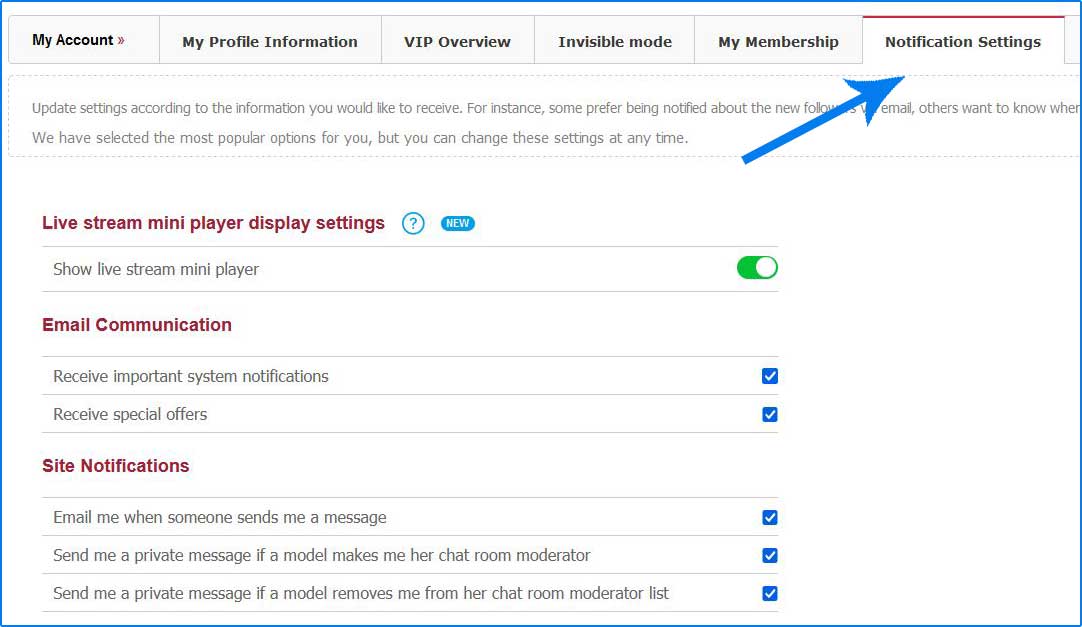
Some of the options are automatically configured but can be changed at any time. The notification settings are usually divided into a few sections depending on the kind of information the member of BongaCams wants to be informed about:
- Site notifications.
- E-mail notifications.
- Comment My Profile.
- Private message settings and so on.
In case you decide to edit some of the sections, choosing the preferred notifications and news, do not forget to press the “Update Settings” button down below to save new configurations.
Account information
Each BongaCams account features multiple settings that can be edited an unlimited amount of times.
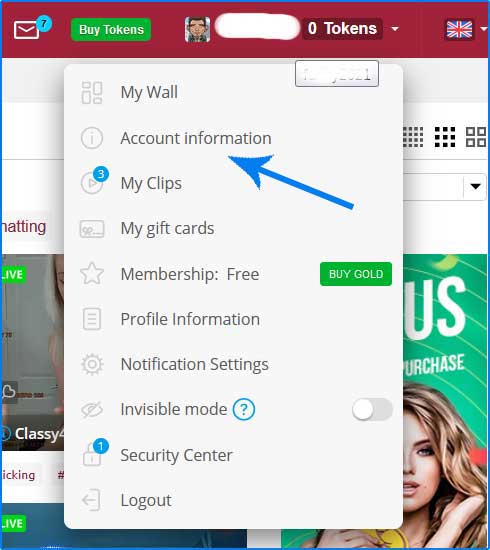
To be able to get acquainted with the available configurations of your account, you will need to access the “Account Information” section by following the instructions:
- Sign up or log in if you already have an account on BongaCams adult cam service.
- Click on your BongaCams nickname in the top right corner of the website.
- In the pop-up menu, press the “Account Information” button to proceed.
Here, you will be able to edit your username, change password, pass the two-step verification, provide or change already existing e-mail address, and so on.
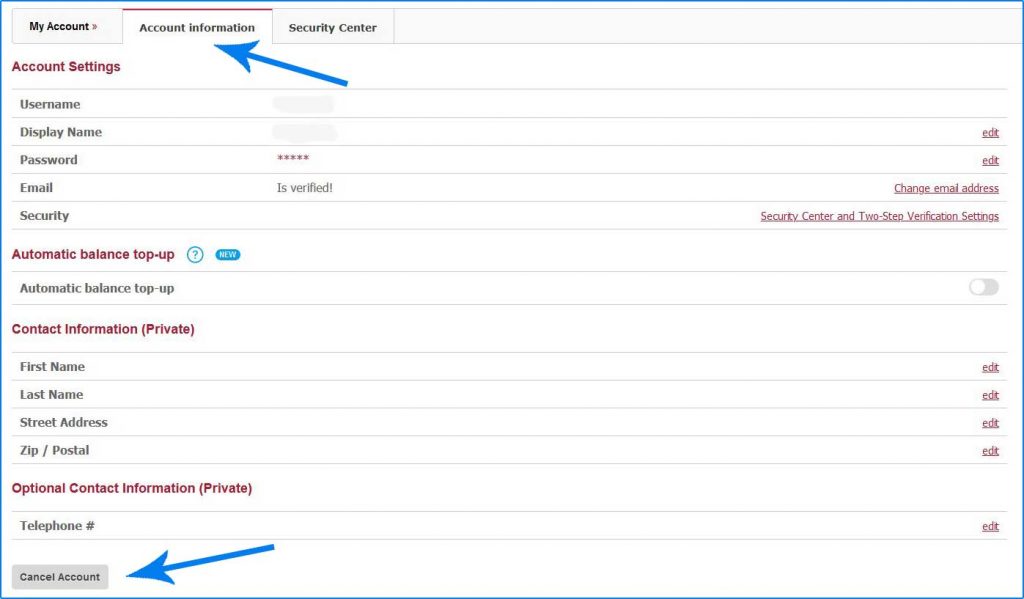
The account information section also features private details about the member of BongaCams. Those are never displayed or provided to other users. The contact information is usually provided in terms of making a payment. Any other billing details can be additionally given upon purchasing credits.
The account information section also allows users to deactivate their account by clicking on the “Cancel account” button below the main configurations. By clicking the button, you will be redirected to a new page where you can deactivate your BongaCams account by choosing the reason for leaving and pressing the “Confirm” button afterward.
Security center
BongaCams account security center allows registered members to protect their personal accounts by:
- Providing e-mail address in order to receive various notifications, including the ones related to suspicious account activity.
- Enabling two-step verification.
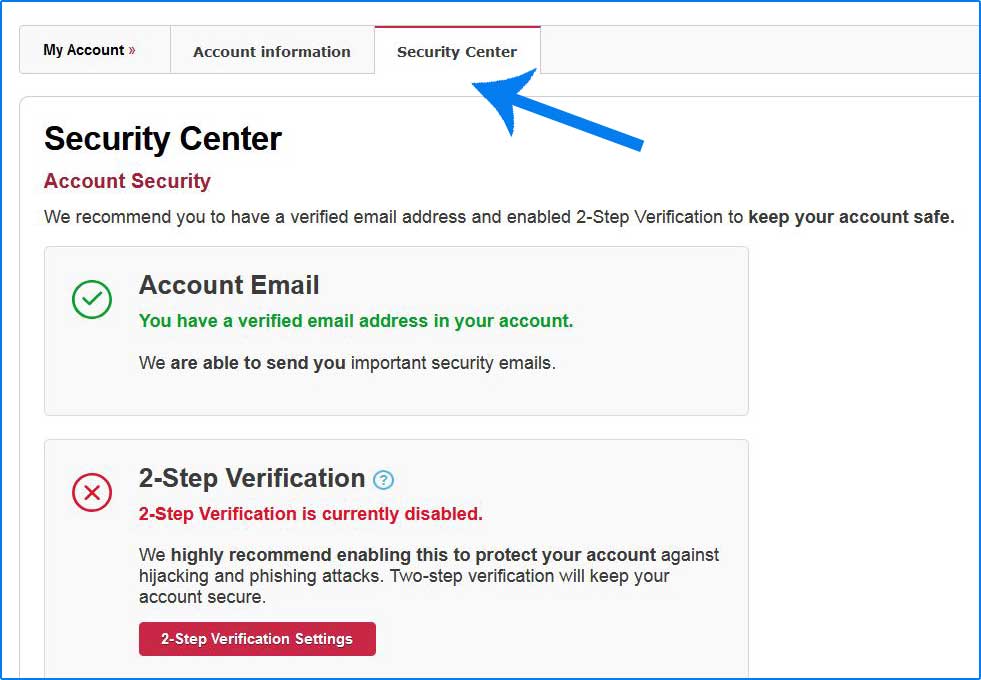
To be able to access the security center and protect your personal account, click on the “Security Center” section in your account settings. Make sure to provide your password to access this part of the configurations. Keep your account safe by enabling two-step verification and providing a personal e-mail address in terms of receiving notifications.
My BongaCams account settings and configurations can be easily edited by registered members of the adult cam platform in order to create a convenient interface and experience all the benefits of the service. The members can get in touch with customer support regarding any additional information and personal assistance.